elom.app
How it worksPricingEnterpriseFAQ
See how it worksSign inStart free workspace

One connected operating system

Follow the client from first interest to the next visit.
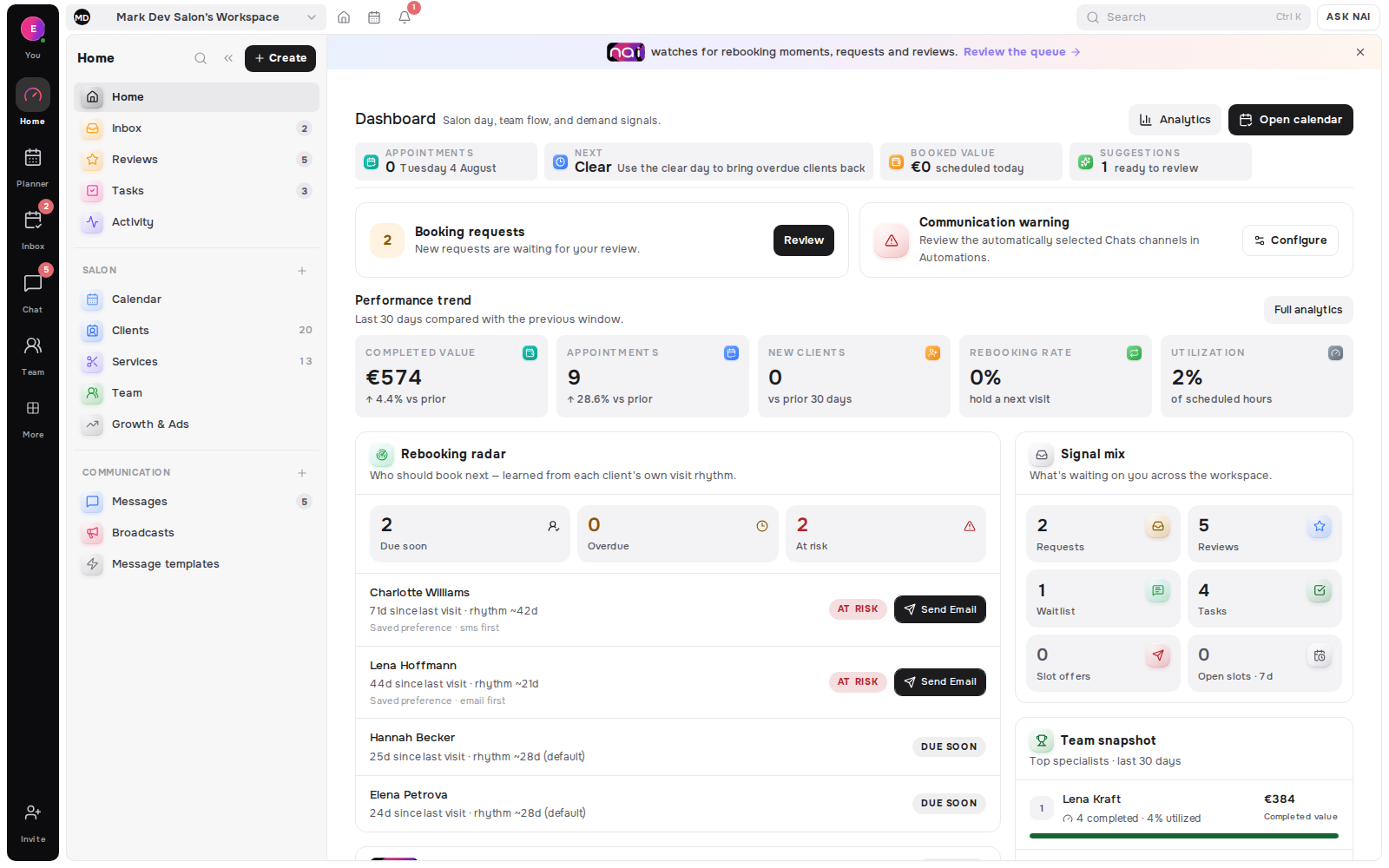
Today’s Opportunities inside the Belom workspace
Explore every feature

Relationship intelligence

Know who needs you next

Signals, memory and return timing in one daily view.

Today’s OpportunitiesClient MemoryRebooking RadarEmpty Slot Matcher

Booking & operations

Run the working day

Bookings, requests, people and capacity stay aligned.

Planner & CalendarRequests & WaitlistServicesTeam & LocationsDeposits & Prepaid

Communication

Reply with context

Every conversation stays attached to the client record.

MessagesSmart Links & QRBroadcasts & AutomationsNAI assistant

Demand & booking

Turn attention into visits

A polished path from discovery to a confirmed booking.

Online BookingGrowth & AdsContent CalendarReviews & LeadsAnalytics & Economy

Works across Telegram · WhatsApp · Instagram · Messenger · Email · SMS

Learn

Learn hubHow it worksProduct featuresFAQ

Discover

BlogWhat an online booking page needs: seventeen things a client checksHow to know which client should book nextWhen to message a client about their next visit

Support

Help centreAboutContactSign in

Featured

▶See how Belom worksFollow the relationship loop◧Today’s OpportunitiesSee who needs attention next
EnglishenEestietРусскийruSuomifiDeutschdeLatviešulvLietuviųlt

Your booking page and client messages follow the client's language. The workspace follows yours.

elom.app

Navigate

01Product02How it works03Pricing04Enterprise05Learn06FAQ

Product

Relationship intelligence
Today’s OpportunitiesClient MemoryRebooking RadarEmpty Slot Matcher
Booking & operations
Planner & CalendarRequests & WaitlistServicesTeam & LocationsDeposits & Prepaid
Communication
MessagesSmart Links & QRBroadcasts & AutomationsNAI assistant
Demand & booking
Online BookingGrowth & AdsContent CalendarReviews & LeadsAnalytics & Economy

Learn & support

Learn hubHow it worksProduct featuresFAQBlogWhat an online booking page needs: seventeen things a client checksHow to know which client should book nextWhen to message a client about their next visitHelp centreAboutContactSign in

Language

EnglishenEestietРусскийruSuomifiDeutschdeLatviešulvLietuviųlt

Your booking page and client messages follow the client's language. The workspace follows yours.

Sign inStart free workspace
Belom blog17 articles · Updated August 18, 2026

Practical thinking for the work between visits.

AuditBookingBooking PageClient MemoryClientsLanguagesMessagesMetricsNAINO ShowsOpportunitiesRebookingServicesSetupWaitlist

Clear guides on turning attention into bookings, keeping client context useful and making the next visit easier to earn.

Explore Learn→

Notes from Belom

All posts

2 articles

AllAuditBookingBooking PageClient MemoryClientsLanguagesMessagesMetricsNAINO ShowsOpportunitiesRebookingServicesSetupWaitlist
August 18, 2026·10 min read
Booking

Set up your booking page in one evening

A practical sequence for turning your service list, working hours and public page into one current booking path you can share by link or QR - plus what the platforms block from search engines.

Cover for Set up your booking page in one evening
set-up-your-booking-page-in-one-evening↗
July 20, 2026·8 min read
Booking Page

What an online booking page needs: seventeen things a client checks

A client silently answers seventeen questions before they book. We audited 62 real salon booking pages: almost all answer the easy ones, and almost none answer the three that protect your calendar.
Cover for What an online booking page needs: seventeen things a client checks
what-an-online-booking-page-needs↗

Belom for professionals

Put the next useful idea to work in your own client journey.

We will email you a sign-in code · no card required

Returning clients. Filled appointments. More value from every working day.

Start a free workspace↗Help center↗

Client memory · Booking · Rebooking

“hears the silence so loud”

Relationship

Today’s OpportunitiesClient MemoryRebooking RadarEmpty Slot MatcherNAI assistantReviews & Leads

Booking & operations

Online BookingPlanner & CalendarRequests & WaitlistServicesTeam & LocationsDeposits & Prepaid

Messages & growth

MessagesBroadcasts & AutomationsSmart Links & QRGrowth & AdsContent CalendarAnalytics & Economy

Explore

LearnBlogHow it worksAll productsPricingFAQAboutContactSign in

Who it's for

For solo professionalsFor service teamsFor multi-location businesses

© 2026 Belom.app. All rights reserved.

Privacy policyCookie policyTerms of service

Privacy choices

Choose which optional data Belom may use. Essential cookies stay on so booking and security continue to work.

Optional categories start switched off. “Save choices” stores exactly what is shown above, so a switch left off is recorded as a refusal; “Reject optional” refuses all of them; “Accept all” turns all of them on.

Read the Privacy Policy and Cookie Policy. You can change this choice at any time.